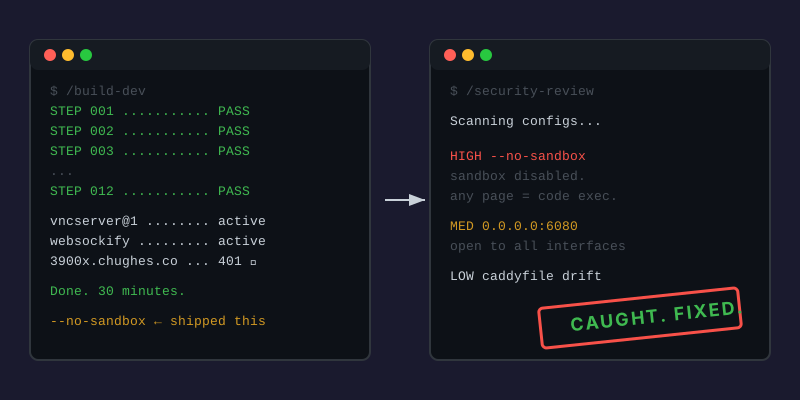
The criticism that sticks
There’s a version of the AI-assisted infrastructure story that goes like this: you’re walking around in public with your pants at your ankles, and you don’t even know it. You pasted configs from a chatbot, typed systemctl enable, and called it production. You don’t know what you shipped. You don’t know what’s exposed.
I think about this a lot. Not because it’s wrong. Because it’s half right.
What actually happened today
I wanted my Linux desktop in a browser tab. The 3900X (Ryzen 9, 64GB, Ubuntu 24.04) has been my dev machine for a while, but GUI apps like Obsidian required sitting at the physical monitor. I wanted https://3900x.chughes.co, a login prompt, and a desktop. From anywhere.
I already had the infrastructure. Caddy handles TLS and reverse proxy for a dozen services. Pi-hole does DNS. The machine was on the network with SSH access. This wasn’t building from scratch. This was adding one more service to an existing system.
Using a structured ops workflow called /build-dev, the whole thing took about 30 minutes. It runs parallel research agents to figure out the right approach, generates an execution plan with verification and rollback for every step, then works through the plan one step at a time. (I wrote about how /build-dev works in detail in 18 Services and No Index.) Four components, each doing one thing:
- TigerVNC creates a virtual display with an XFCE4 desktop. No monitor needed.
- websockify bridges that VNC display to a WebSocket.
- noVNC is a JavaScript client that renders VNC in any browser.
- Caddy terminates TLS, handles auth, proxies the connection.
One apt install command. Two systemd service files. One Caddy stanza. Obsidian opens, Brave opens, clipboard works (mostly). Done.
Then I ran /security-review
Claude Code has a built-in security review skill. You type /security-review, it reads your configs, and it looks for things you missed.
It found three things.
--no-sandbox on Brave (HIGH severity). When Brave wouldn’t launch in the VNC session, I hit a snap cgroup error. I added --no-sandbox to make it work. Classic Stack Overflow move. The security review flagged it immediately: disabling Chromium’s sandbox means any malicious webpage gets code execution as my user. No sandbox escape needed. The flag wasn’t even required for the fix. I removed it. Brave still works.
websockify bound to 0.0.0.0 (MEDIUM severity). The VNC port itself only listens on localhost. Good. But websockify, the WebSocket bridge, was listening on all interfaces. UFW restricts access to just the Infra Pi. But if UFW ever gets reset or disabled, every device on my LAN gets an unauthenticated desktop session. Fixed by binding to the specific LAN IP instead. Defense in depth.
Caddyfile config drift (LOW severity). The tracked config in git was missing a redirect I’d added to the live server. Minor, but exactly the kind of thing that compounds.
All three fixed in under two minutes.
The part I keep coming back to
I would not have caught the --no-sandbox flag on my own. Not today. Maybe not this week. I knew what --no-sandbox does in the abstract. I’ve read the Chromium docs. But in the moment, when the app wouldn’t launch and --no-sandbox made it work, I moved on. That’s how these things ship.
I’m a hobbyist who’s learned lessons over the years. I’m not a security engineer. I can read configs and understand what they do. But reading every config I just wrote and mentally modeling the attack surface? That’s not my strongest skill, and doing it manually is a waste of time when a tool can do it in 30 seconds.
I can’t see the matrix myself. I use Claude to see the matrix. I just chat.
What this actually looks like as a workflow
It’s not “AI builds infrastructure.” It’s three distinct phases:
Build. Use structured ops tooling to plan and execute. Parallel research agents figure out the right systemd service type, the correct PIDFile path, whether snaps work in a VNC cgroup. Verification steps confirm each component works before moving to the next. This is the part that takes 30 minutes instead of 3 hours.
Audit. Run /security-review on everything you just built. It’s adversarial by design. It doesn’t care that you just spent 30 minutes getting this working. It cares that you disabled a sandbox.
Fix. Apply the findings. Two minutes.
The criticism is real. If you only do step one, you are walking around with your pants down. The build phase optimizes for “does it work,” not “is it safe.” That’s fine as long as you don’t stop there.
The pants might still be down somewhere
Am I 100% confident everything is locked down? No. I’m a home lab hobbyist, not a pentester. But I went from “I think this is fine” to “a security-focused review found three issues, I fixed all three, and I can point to the commit.” That’s a different kind of confidence. The kind with a git hash instead of a gut feeling.
Now I have a way to check.
Next up: the build phase itself is getting an upgrade. The current /build-dev workflow handles safety and rollback well, but it’s missing things I’ve already built into my feature development workflow. Web research before designing. Parallel agents with enforced roles instead of one-at-a-time generic prompts. Three competing architecture proposals instead of one. A structured review phase with specialized reviewers, not just a single pass. The security review caught what slipped through. The next version of the build workflow should let less slip through in the first place.
Written with Claude.